HPE CloudPhysics Account Team Support
Overview
HPE CloudPhysics restricts visibility to customer lists and data by preventing users who are not entitled to view a customer record from gaining access to the data. This is managed through the use of Account Teams. An account team is a logical structure of individuals entitled to view a customer organization in the HPE CloudPhysics Partner Portals. Individuals in the account team can see the customer in the HPE CloudPhysics Partner Portal on the customer tab, customer inventory reports, and account activity reports. These individuals can also view the customer data as the trusted advisor working with the customer. A user not on the account team will not see the customer name or any details associated with the organization in HPE CloudPhysics, except for the administrators of your portal, who can manage and access all accounts in the organization portal.Manage account team for existing customer
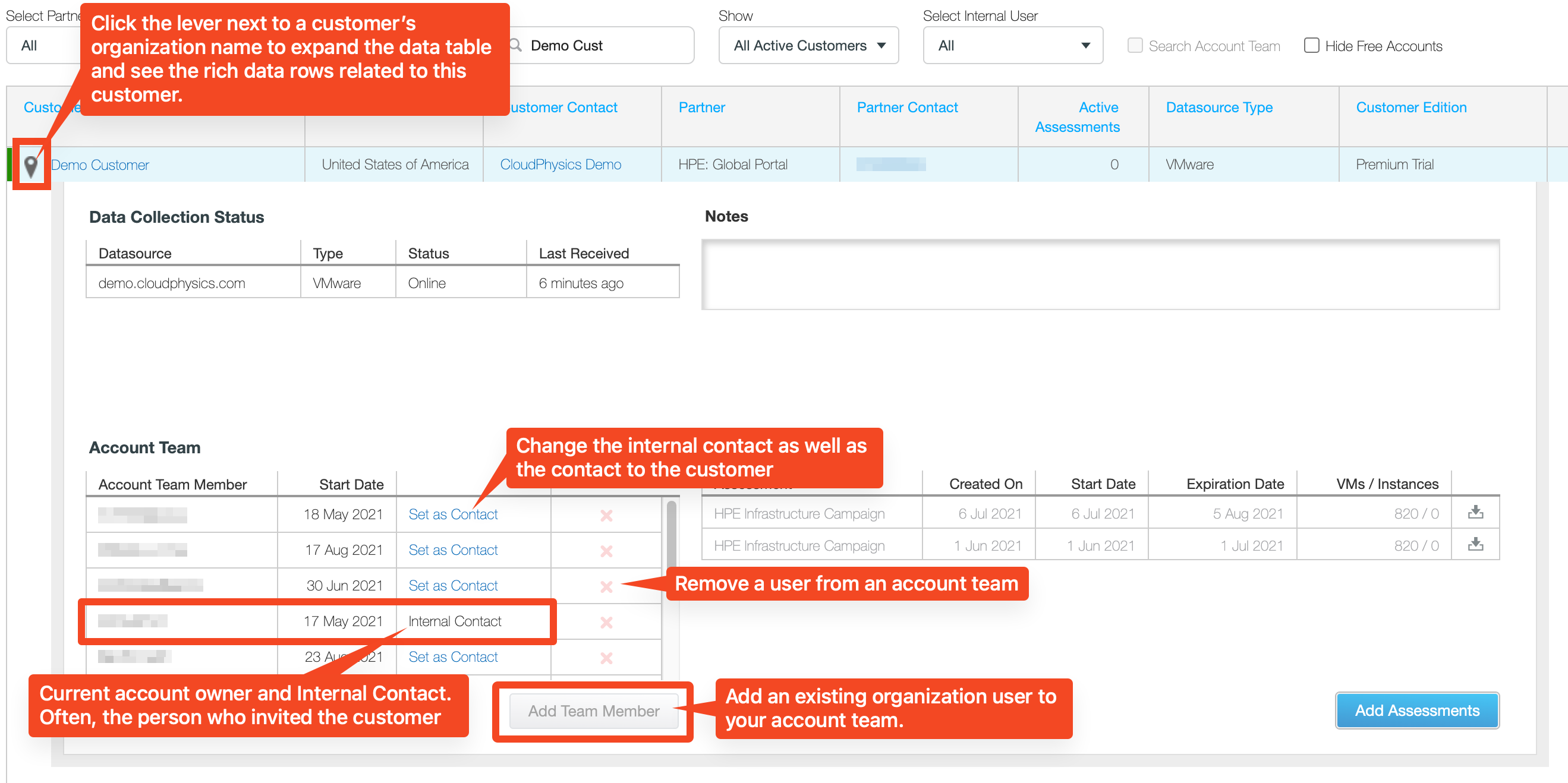
Here are the steps for managing the account of an existing customer in your HPE CloudPhysics Partner Portal. As an account team primary contact, you can add and delete users from your customer account team and assign a new primary account team contact. Once a Customer Account is created, the HPE CloudPhysics Partner Portal will display a list of all customers an individual is entitled to see. This list will include customer accounts where the user is a member of the account team or an administrator for the partner organization. Only the Administrator and Internal Contact can modify this account team. The Account Team will be displayed with all current users in the account team. Adding and editing users on an existing account team:- Expanding a customer data row will expose Customer Account details visible to the account team. These details include the current status of deployed appliances, Account Team Members, notes, and the current/past assessments. The Account Team members and Administrators can manage the account team.
- Clicking on the "Add Team Member" will present a dialog box to allow you to add existing HPE CloudPhysics users in your portal to your account team. These users must already have an account in the portal to be added to the account team. If they do not have a user account, please get in touch with an administrator and ensure the user is invited to your portal.
- By clicking on the red X located on the right side of the contact list, you can remove a user from your account team.
- Administrators and account internal contacts can change the internal contact by selecting "Set as Contact" to the right of the user name.
- Users who have been invited will immediately be able to see the customer in their account list and will be able to view the customer data. If the account user is already logged in, they may need to refresh their browser to see the changes to the account team.
Define account team during customer invitation
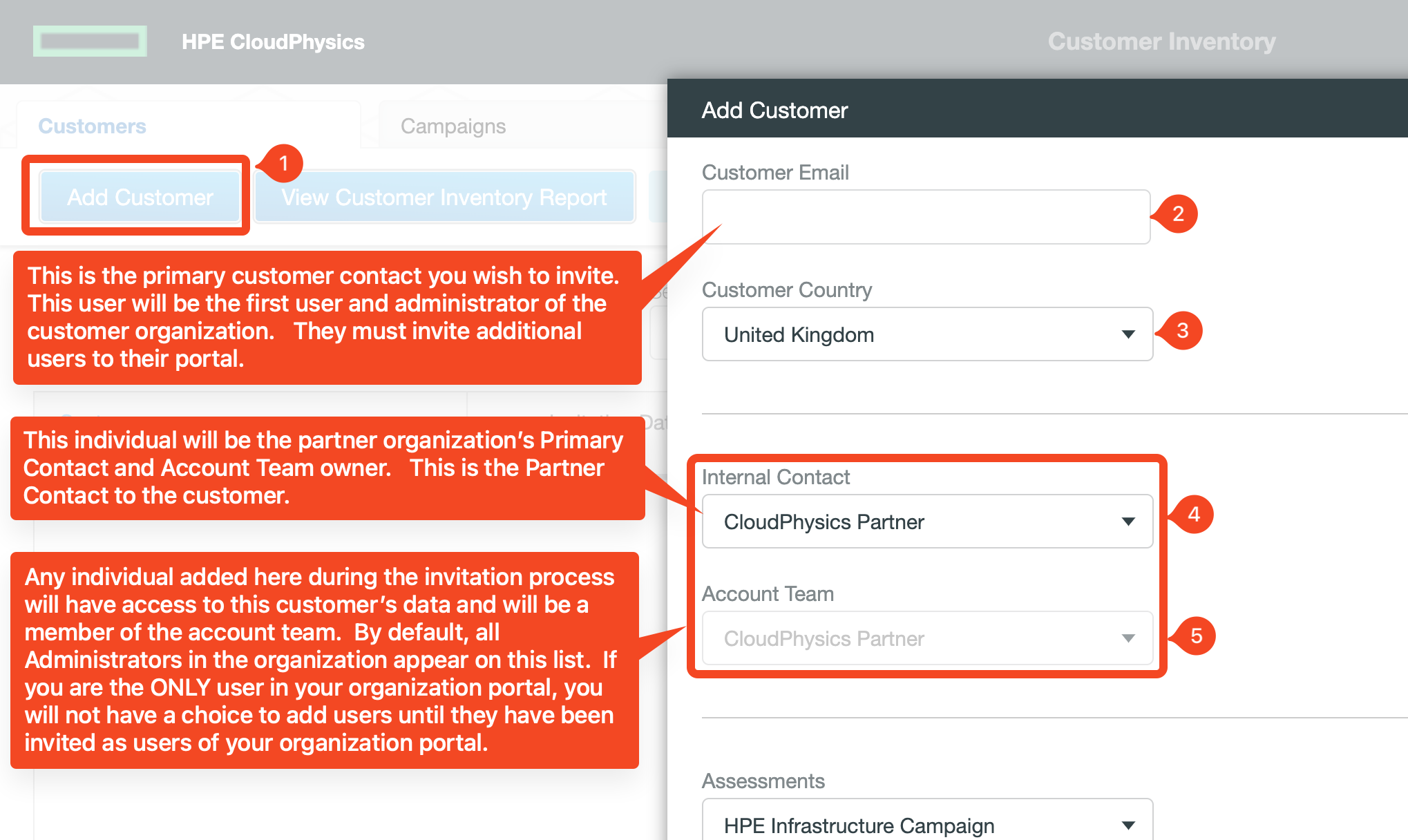
Here are the steps to defining your account team during the invitation process.- Select: Invite a new Customer in the Partner Portal on the Customer Tab.
- Specify the customer email address of the individual you wish to invite. This will create a NEW customer portal for the user domain. ONLY INVITE 1 USER from the organization. The customer will be responsible for managing their own users once they accept the invite. The first user invited will be the administrator of the customer portal and will be responsible for their own users.
- Select the Country of the customers' CORPORATE HQ location. This is used for HPE Geography-based reporting.
- Internal Contact - This will be the user who will be the primary contact to the customer and the account owner. This individual can manage the account team and view all customer data.
- Account Team - This will be the individuals who you wish to grant access to the customer data within your organization. Your employees should NEVER be users in the customer portal, as this will restrict their data visibility. Users in the account team have full access to all customer data without being users in their portal. By default, all Administrators in your organization are included in this list. This is to ensure they can manage the accounts should the account owner depart.
- The individual who invites a new customer is, by default, the Account Team Primary Contact. This individual can see the customer and their data.
- The internal contact is the primary account owner and is listed as the Partner Contact in the HPE CloudPhysics Partner Portal. This person will also be listed as the Partner Contact in the customer's Partner Management tab.
- Users in the Account Team will include all administrators in your organization by default. You can modify this list and add additional users or remove individuals as required.
- If you are the only user in your organization, there will be no users to select in the Account Team pick list. You will
need to add users to the organization before you can add them to the account team.
Support
If you need account team and management support, please contact the HPE CloudPhysics Go To Market (GTM) and Partner Enablement team at CloudPhysics@hpe.com for assistance. HPE CloudPhysics partner enablement cannot add users to partner organizations in HPE CloudPhysics. The CloudPhysics GTM/Partner Enablement team can only assist you in identifying who the account owner is and the administrators within your organization who can provide these changes for you.